

How to switch models
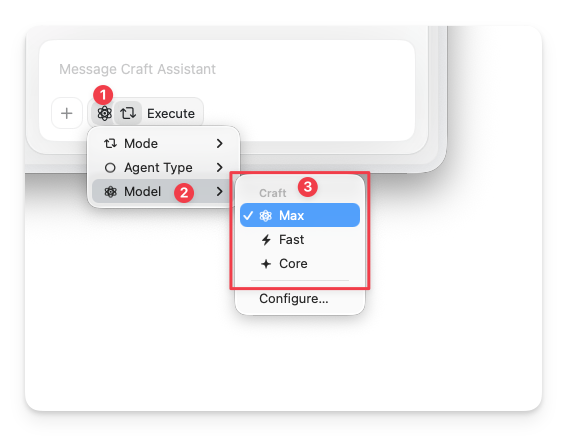
You can change the model at any time from inside the Assistant panel.1
Open the Assistant panel
Open the Assistant from any document or Space view.
2
Tap the Assistant button
Below the input field, tap the Assistant button.
3
Select Model
Choose Model from the popup, then pick the model you want to use.
Model comparison
The Local tier groups several models you can choose between:
On-device models process everything locally on your device — no data is sent to external servers. They don’t count toward your AI usage but are only available at document level.
Apple Foundation Model needs Apple Intelligence turned on, plus a recent iPhone, iPad, or Mac. If you don’t see it in the model list, check the requirements below.
When to choose each model
Core
The default tier for most everyday tasks. Use for in-document questions, quick summaries, and simple transformations.- Uses a low amount of AI usage
- Gives a single response per conversation
- Read-only — no document editing
Local
On-device models that run entirely on your device. No data is sent to external servers.- On-device models don’t count toward your AI usage
- Apple Foundation Model supports back-and-forth conversations and runs entirely on-device — a good choice for iterating on a question privately
- LLaMa 3.2 gives a single response per conversation
- Read-only — no document editing
Fast
Use for space-level queries and quick edits.- Good balance of speed and quality
- Supports editing on supported platforms
- Works well for short to medium editing tasks
Max
Use for complex reasoning and high-quality editing.- Best output quality for large or structured edits
- Best for advanced multi-document analysis
- Supports editing on supported platforms
Platform differences
All cloud models (Max, Fast, Core) are available on every platform — macOS, iOS, Windows, and Web. Local models (Apple Foundation Model, LLaMa 3.2) are available on Mac, iPad, and iPhone only. Editing with the Assistant is currently supported on macOS and iOS — see Editing with Craft Assistant for details.Apple Foundation Model not showing up?
Apple Foundation Model only appears in the model list when your device can run it. If it can’t, the model is hidden completely (there’s no greyed-out entry), so it’s easy to assume something is broken. It shows up automatically once all of these are true:- You’re on an iPhone, iPad, or Mac (not Windows or web).
- Your device supports Apple Intelligence, and Apple Intelligence is turned on in your device settings.
- You’re running the latest iOS, iPadOS, or macOS.
- Apple Intelligence has finished downloading. Right after you enable it, the on-device model downloads in the background, and it stays hidden until that finishes.
Related Articles
Using Craft Assistant
Learn how to start conversations and work with the Assistant
Editing with Craft Assistant
See what editing can do and how modes work
Usage & Limits
Understand AI usage and top-up options