

Using Craft with Setapp
- macOS
- iOS
- Web
Setapp needs to be running in the background for Craft to launch.
What’s included with Setapp
Your Setapp subscription grants you access to Plus tier features, including:- 1TB storage per space (up to 5 spaces per team)
- 5GB upload limit per file
- Advanced Share Analytics
- Custom Domains
- AI Assistant benefits, including a monthly AI usage refresh, access to advanced Assistant models, and Bring Your Own Key (BYOK)
- Setapp AI provider: use your Setapp AI credits directly in the Assistant, with ChatGPT Luna as the default model. See Connect to AI Providers for details.
Setapp includes Plus tier features for your Craft account, but it does not support inviting members to your team. You can still collaborate with others at the document level.
Troubleshooting
Subscription Not Recognized or AUTH Error
If Craft doesn’t recognize your Setapp subscription, or you see an error likeAUTH/2/650:
1
Make sure you’re launching Craft from the Setapp app, not from your Applications folder or Dock directly
2
Ensure Setapp is running in the background — Craft needs it to verify your subscription
3
If the issue persists, quit both Craft and Setapp completely, then reopen Setapp first, followed by Craft
If you previously installed Craft from the App Store or directly from craft.do, your Mac may be opening that version instead of the Setapp version. Check that you’re using the correct copy by looking for the Setapp badge on the app icon.
”Another Craft is Already Installed” Error
If you see this pop-up after opening the Setapp version on Mac:1
Delete the Craft app
2
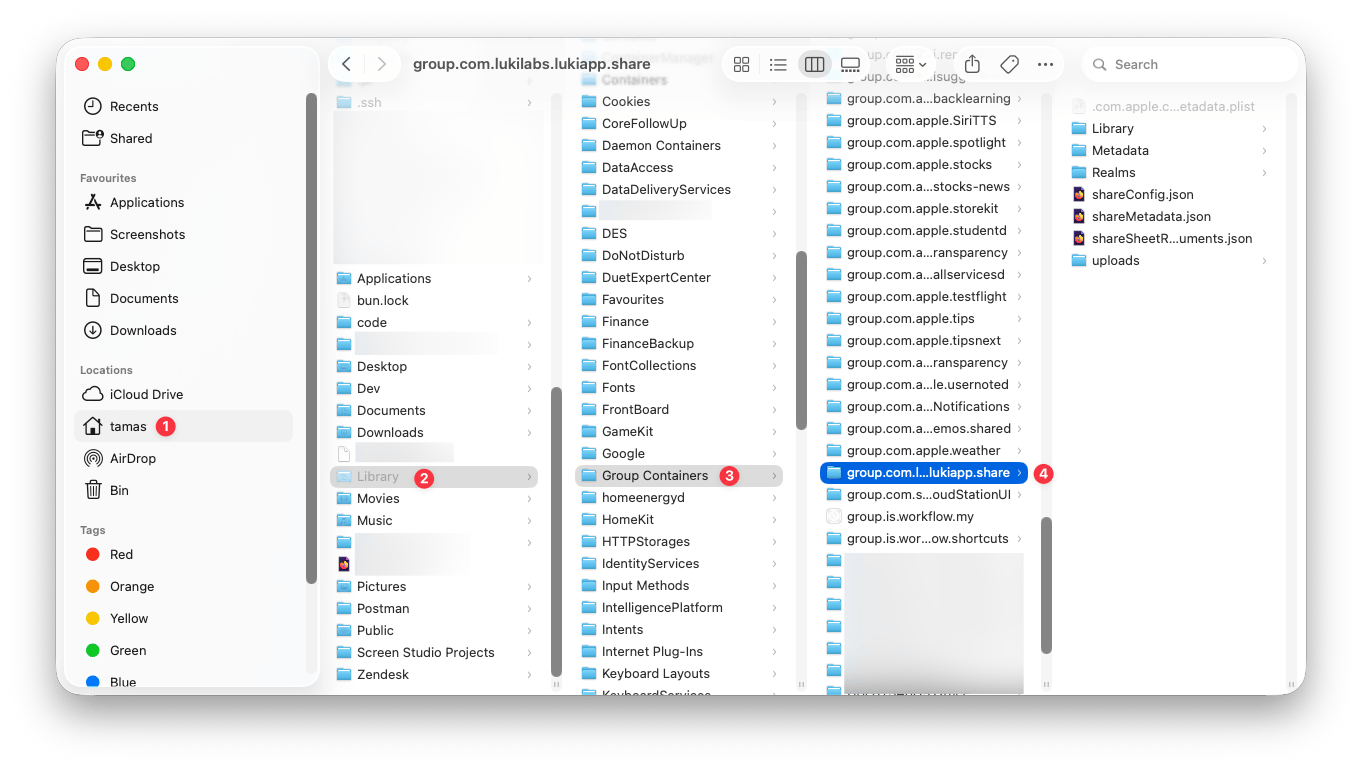
Open Finder and navigate to your home folder
3
Press
Cmd + Shift + . to display hidden folders4
Delete
~/Library/Group Containers/group.com.lukilabs.lukiapp.share/5
Delete
~/Library/Containers/com.lukilabs.lukiapp6
Download Craft from Setapp again
Switching from Setapp to a Craft subscription
It is not possible to upgrade a team while it is tied to a Setapp subscription. If you want to subscribe to Plus, Family, Business, or Team directly with Craft, choose one of these options:1
Create a new team
Create a new team, then subscribe directly through craft.do/pricing.
2
Move after Setapp expires
Cancel your Setapp subscription, wait until it fully expires, then subscribe through our website or the App Store.
If you need help creating a new team, switching plans, or understanding what happens to your current setup, contact our support team. We’ll help you choose the safest option.
Moving from Craft Subscription to Setapp
Same Email for Both Accounts
If your Craft account email matches your Setapp account email:1
Download the Setapp version of Craft through Setapp
2
Sign in with that email
3
Your existing Craft account will be automatically assigned to Setapp
4
Your previous content will be visible right away
Different Emails
If your Craft account has a different email than your Setapp account: You can move content between accounts manually by exporting and importing documents.Related Articles
Plans and Pricing
Compare all Craft subscription plans
Check Storage Usage
Monitor your space storage
Export Documents
Export your content from Craft
Teams
Learn how teams and spaces work in Craft
Contact Support
Get help choosing the right subscription path