> ## Documentation Index
> Fetch the complete documentation index at: https://craft-support.mintlify.site/llms.txt
> Use this file to discover all available pages before exploring further.
# 空間
> 了解 Craft 中的空間是什麼,以及如何運用空間來區分你的專案、情境與團隊。
空間是 Craft 中用來區分工作的獨立區域。每個空間都有自己的文件、資料夾和組織方式,因此一個空間的內容會與其他空間彼此獨立。
## 空間的適用情境
當你想在工作的不同部分之間劃出清楚的界線時,就使用獨立的空間:
* **工作與個人生活** - 將工作與私人筆記分開。
* **專案或客戶** - 為每個重要的專案或客戶設立專屬空間。
* **團隊** - 在與個人空間彼此獨立的共用空間中與他人協作。
你的帳戶在建立時就附有一個預設的個人空間,你可以隨時新增更多空間。
## 在空間之間切換
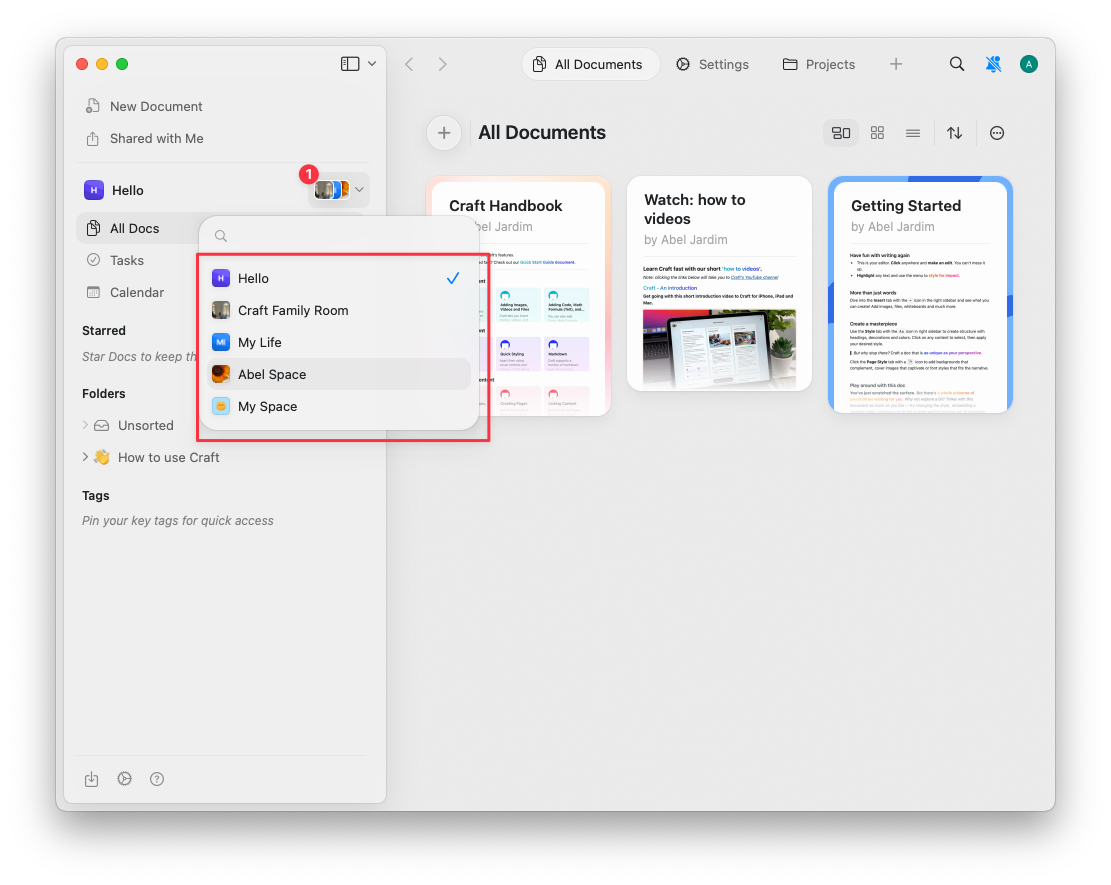
在 Home 視圖中,使用側邊欄左上方的 **空間下拉選單** 在各個空間之間切換。
 ## 相關文章
建立、自訂、移動文件以及刪除空間。
在共用的團隊空間中與他人協作。
新增 Craft 帳戶、在帳戶之間切換並移動文件。
## 相關文章
建立、自訂、移動文件以及刪除空間。
在共用的團隊空間中與他人協作。
新增 Craft 帳戶、在帳戶之間切換並移動文件。