> ## Documentation Index
> Fetch the complete documentation index at: https://craft-support.mintlify.site/llms.txt
> Use this file to discover all available pages before exploring further.
# 重新排列欄位和欄
> 自訂 Collection 欄位和欄在不同檢視中的顯示方式。
透過自訂欄位和欄的顯示方式來保持 Collections 的井然有序。您可以控制 Collection 中的**欄位預設順序**以及**特定檢視中的欄順序**。
## 重新排列 Collection 中的欄位
變更欄位順序會影響**個別項目頁面**上的顯示方式,並為所有新檢視設定**預設順序**。
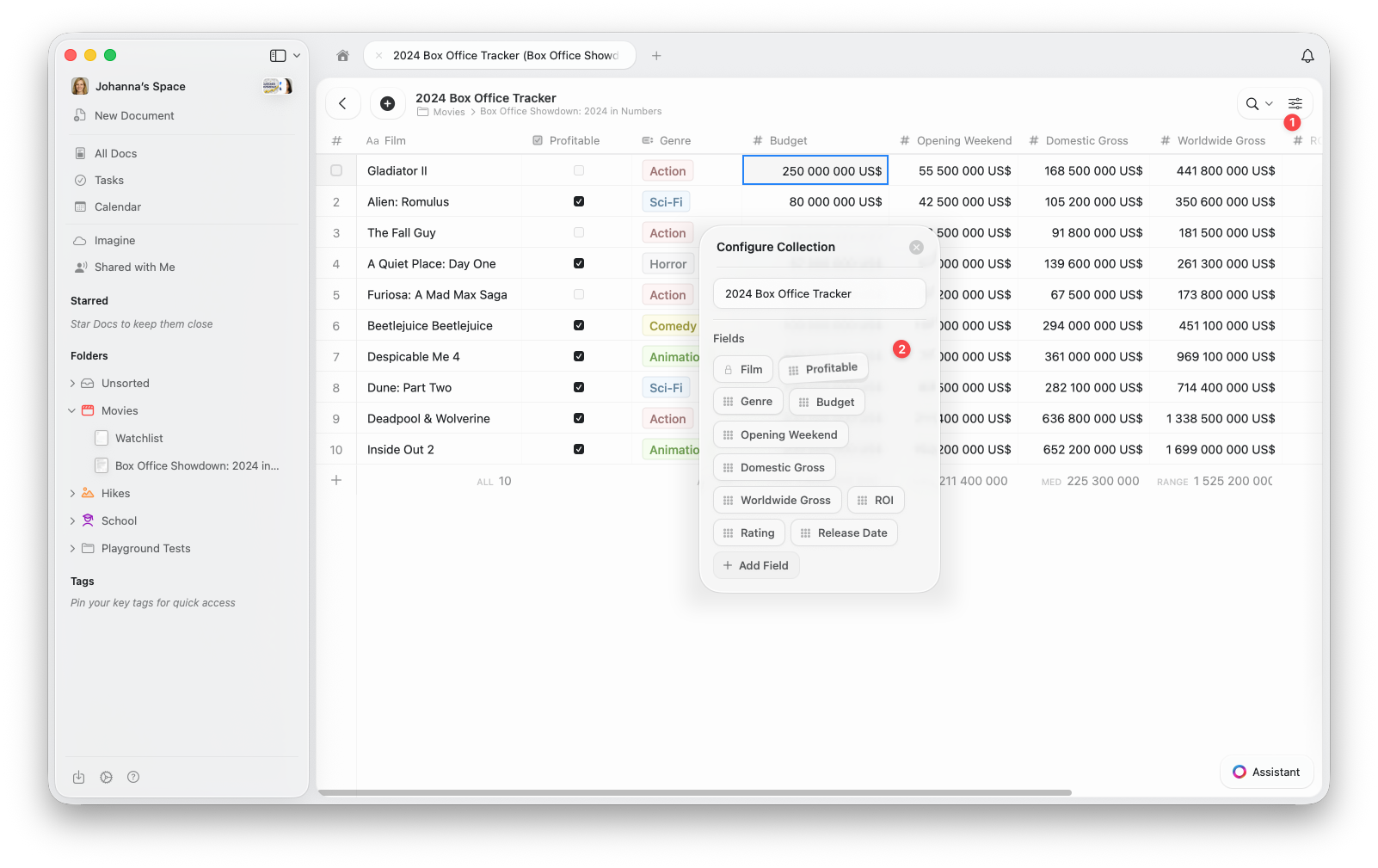 開啟 Collection 頂部的設定選單 **(⋯)**
從選單中選擇**設定 Collection**
在設定 Collection 視窗中,**拖放**欄位以重新排列。您也可以在此新增欄位或移除現有欄位。
新的順序將自動套用至 Collection 中的所有項目以及您建立的任何新檢視。
## 重新排列檢視中的欄
您也可以為**特定檢視**重新排列欄。這讓您能靈活地自訂顯示內容和排列方式,而無需變更 Collection 的預設欄位順序。
開啟設定選單 **(⋯)**
選擇**顯示/隱藏欄位**
**拖放**欄位以按您的需要重新排列欄。您可以在此切換要在檢視中顯示的欄位。
開啟 Collection 頂部的設定選單 **(⋯)**
從選單中選擇**設定 Collection**
在設定 Collection 視窗中,**拖放**欄位以重新排列。您也可以在此新增欄位或移除現有欄位。
新的順序將自動套用至 Collection 中的所有項目以及您建立的任何新檢視。
## 重新排列檢視中的欄
您也可以為**特定檢視**重新排列欄。這讓您能靈活地自訂顯示內容和排列方式,而無需變更 Collection 的預設欄位順序。
開啟設定選單 **(⋯)**
選擇**顯示/隱藏欄位**
**拖放**欄位以按您的需要重新排列欄。您可以在此切換要在檢視中顯示的欄位。
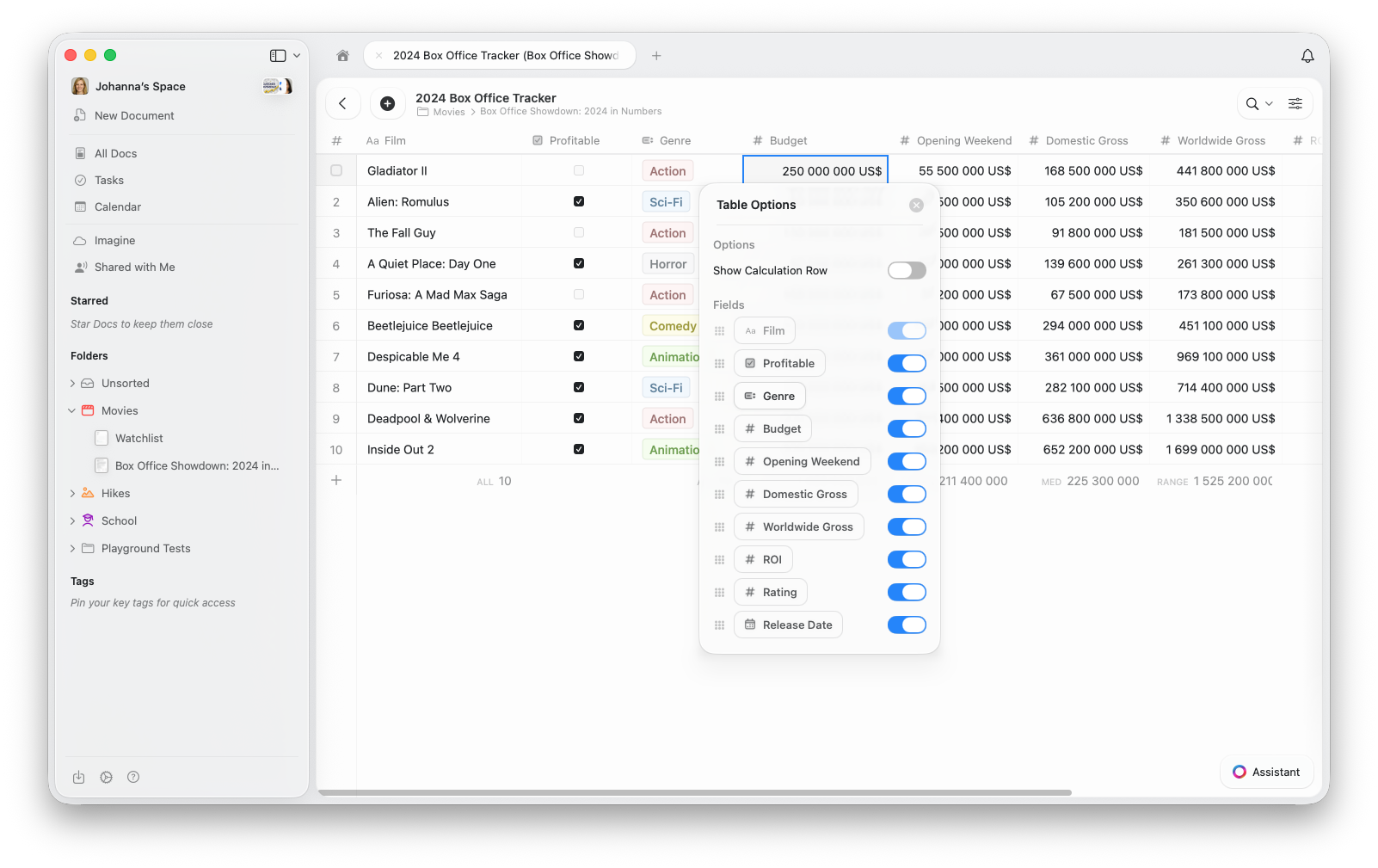 此操作僅變更目前檢視的版面配置——您的預設欄位順序和其他檢視保持不變。
在圖庫檢視中,欄位可見性控制每張卡片上顯示的屬性。「顯示/隱藏欄位」中的順序決定了每張卡片上的顯示順序。
使用**欄位重新排列**在整個 Collection 中建立一致的結構,使用**欄重新排列**為特定檢視建立自訂版面配置。
## 相關文章
瞭解 Collection 檢視中的排序、篩選和分組
將您的 Collection 顯示為附有圖片預覽的視覺化卡片
瞭解 Craft Collections 和欄位類型
此操作僅變更目前檢視的版面配置——您的預設欄位順序和其他檢視保持不變。
在圖庫檢視中,欄位可見性控制每張卡片上顯示的屬性。「顯示/隱藏欄位」中的順序決定了每張卡片上的顯示順序。
使用**欄位重新排列**在整個 Collection 中建立一致的結構,使用**欄重新排列**為特定檢視建立自訂版面配置。
## 相關文章
瞭解 Collection 檢視中的排序、篩選和分組
將您的 Collection 顯示為附有圖片預覽的視覺化卡片
瞭解 Craft Collections 和欄位類型