> ## Documentation Index
> Fetch the complete documentation index at: https://craft-support.mintlify.site/llms.txt
> Use this file to discover all available pages before exploring further.
# 空间
> 了解 Craft 中的空间是什么,以及如何用它来区分你的项目、场景和团队。
空间是 Craft 中用于区分工作的独立区域。每个空间都有自己的文档、文件夹和组织方式,因此一个空间的内容与其他空间相互独立。
## 空间的适用场景
当你想在工作的不同部分之间划出清晰界限时,就使用单独的空间:
* **工作与个人生活** - 把工作和私人笔记分开。
* **项目或客户** - 为每个重要的项目或客户设立专属空间。
* **团队** - 在与个人空间相互独立的共享空间中与他人协作。
你的帐户在创建时就带有一个默认的个人空间,你可以随时添加更多空间。
## 在空间之间切换
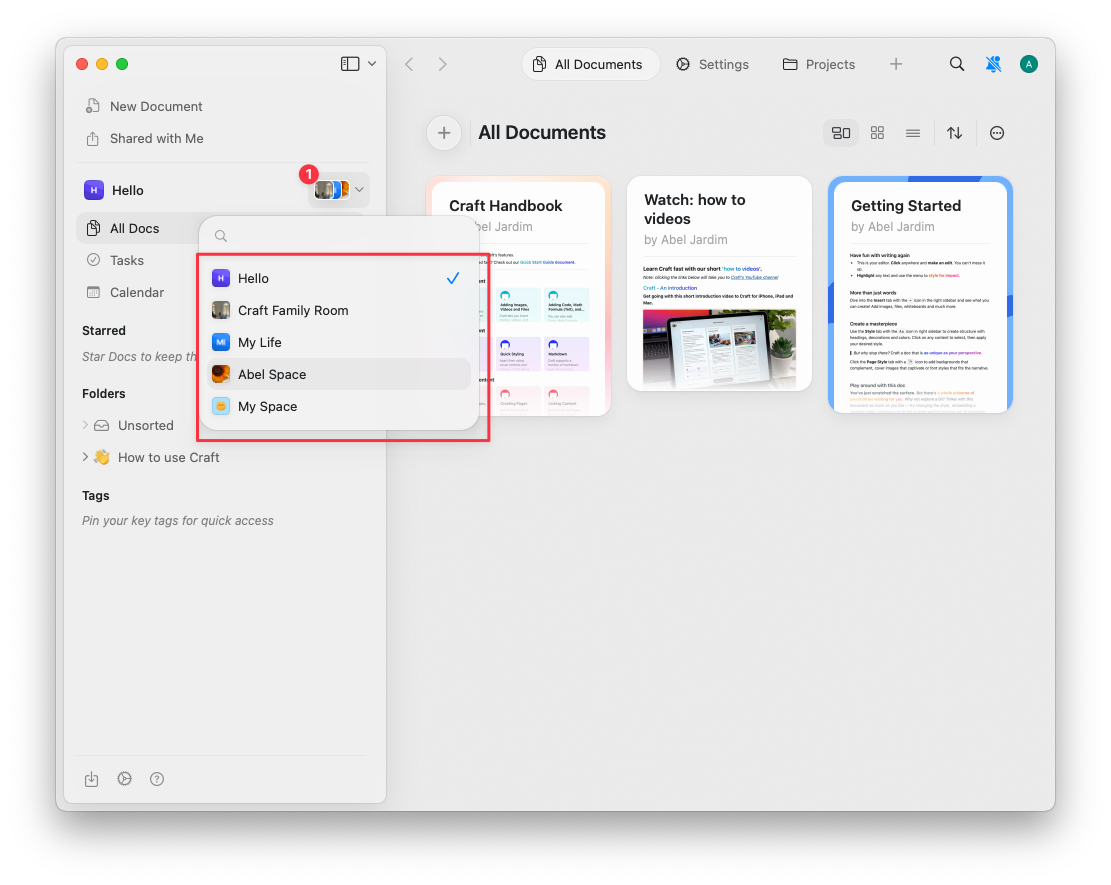
在主视图中,使用侧边栏左上角的 **空间下拉菜单** 在各个空间之间切换。
 ## 相关文章
创建、自定义、移动文档以及删除空间。
在共享的团队空间中与他人协作。
添加 Craft 帐户、在帐户之间切换并移动文档。
## 相关文章
创建、自定义、移动文档以及删除空间。
在共享的团队空间中与他人协作。
添加 Craft 帐户、在帐户之间切换并移动文档。