> ## Documentation Index
> Fetch the complete documentation index at: https://craft-support.mintlify.site/llms.txt
> Use this file to discover all available pages before exploring further.
# 在 Craft 文档中嵌入 Google 地图
> 将可交互的 Google 地图链接直接嵌入到您的 Craft 文档中。
你可以通过以下步骤轻松将 Google 地图链接嵌入到你的 Craft 文档中:
**粘贴 Google 地图链接**
从 Google 地图复制链接,并将其作为卡片块粘贴到你的 Craft 文档中。
**打开块选项**
在块的左侧,点击 **three-dot menu (⋯)** 以打开块选项。
**选择 Embed 选项**
从菜单中选择 **Embed** 选项。Google 地图链接将转换为嵌入的地图块。
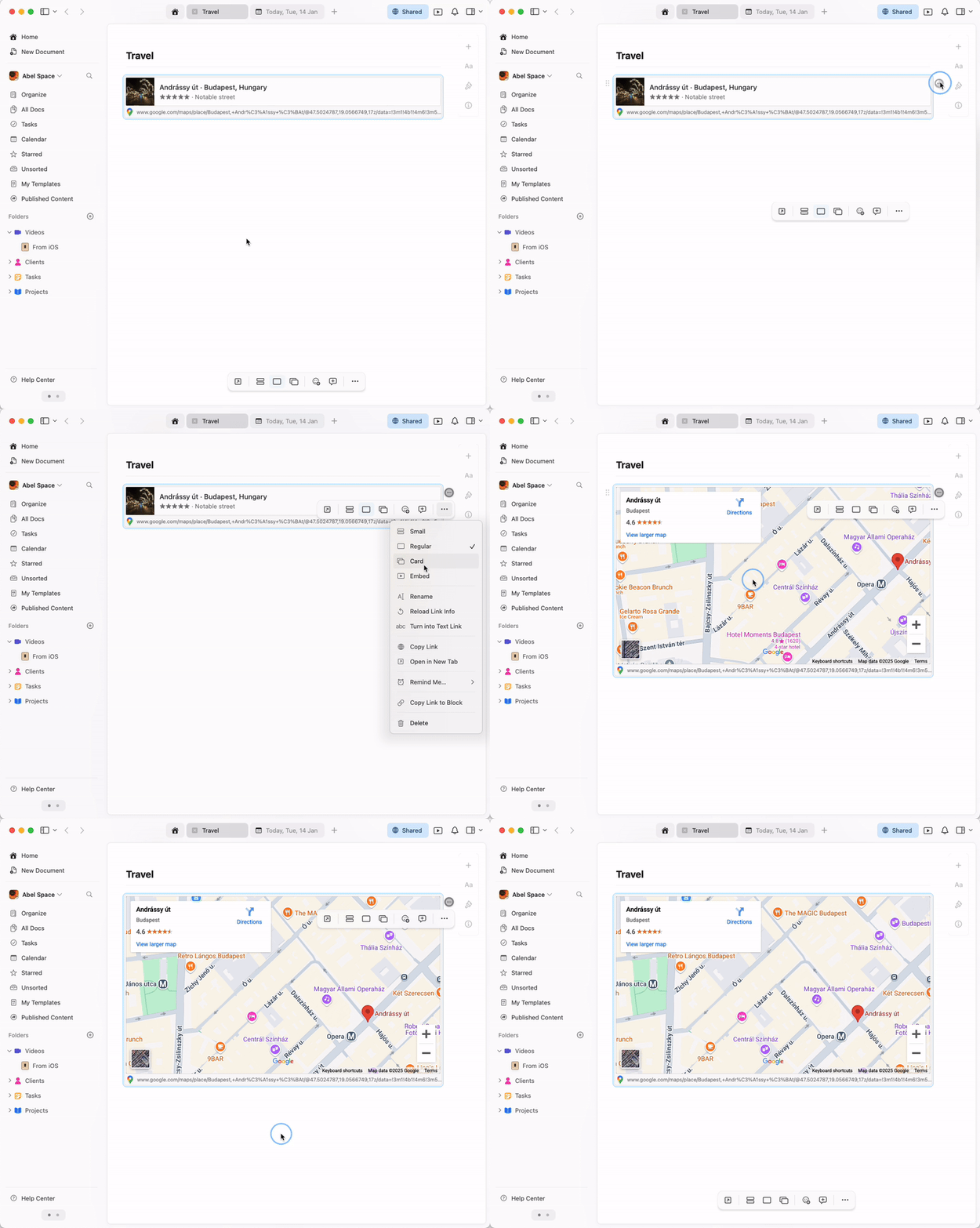 嵌入的地图是完全可交互的 – 你可以直接在 Craft 文档中缩放、平移并探索该位置。