> ## Documentation Index
> Fetch the complete documentation index at: https://craft-support.mintlify.site/llms.txt
> Use this file to discover all available pages before exploring further.
# 文档版本历史
> 了解 Craft 如何自动备份您的文档以及如何恢复之前的版本。
Craft 会自动为您的文档创建备份,使您在需要时可以恢复先前的版本。此功能可确保在发生意外更改或删除时能找回内容。
## 版本历史如何工作
### 每小时自动备份
* 在您持续进行编辑时,系统会每 **60 分钟** 创建文档的快照
* 您进行编辑后,系统会启动计时器
* 如果您继续编辑,满一小时后会自动保存一个快照
* 该过程会重复:只要您保持编辑,系统就会每小时创建新的快照
**示例:**
* 您在 **上午 10:00** 更新文档 → 计时器启动
* 您持续编辑直到 **上午 11:00** → 保存一次备份
* 计时器重置并继续记录更改,直到 **下午 12:00** 保存下一次备份
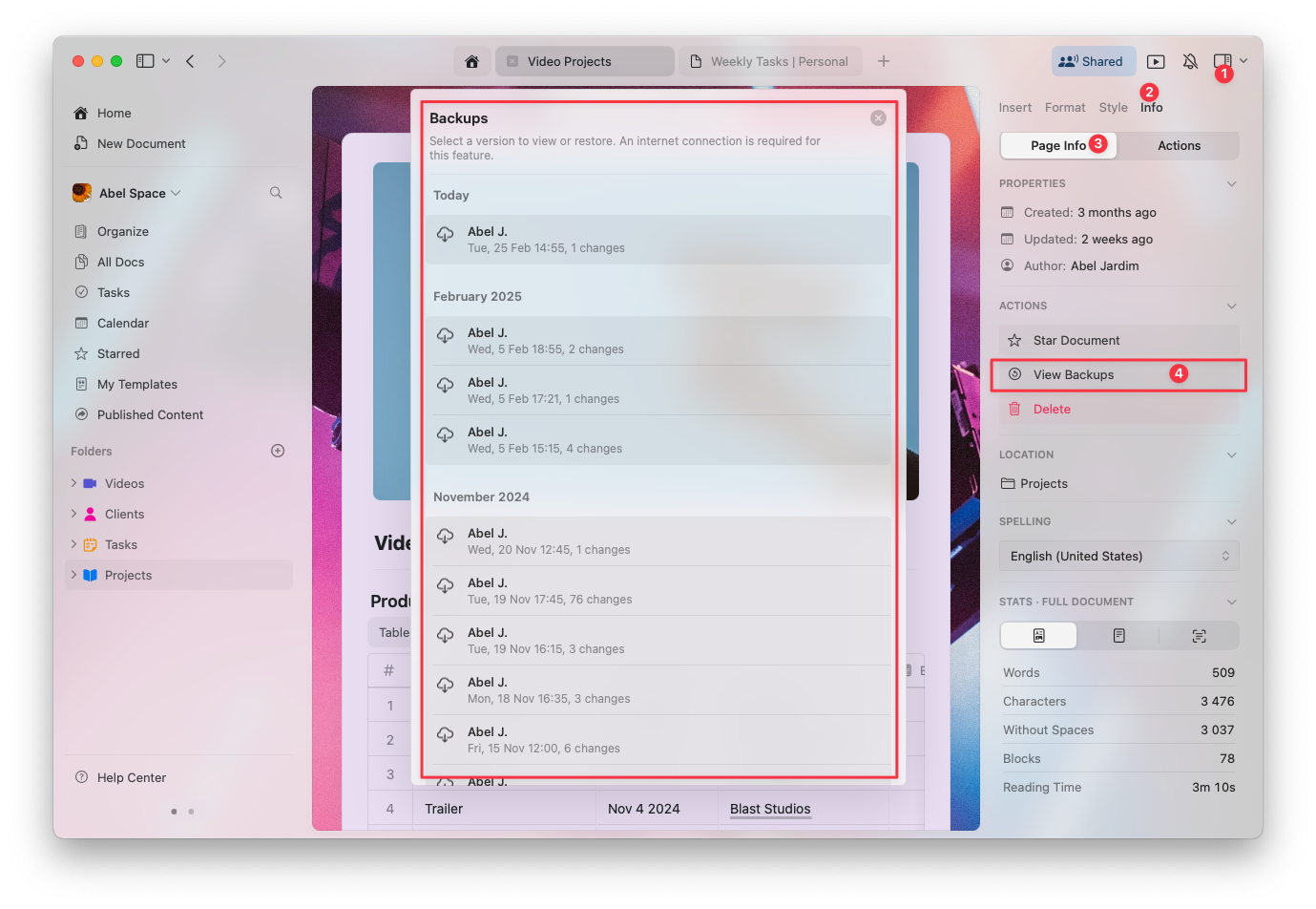
## 如何查看文档备份
打开要查看的文档
在右侧侧边栏中单击 **Info** 选项卡
选择 **View Backups** 以访问已保存版本的列表
从列表中选择一个备份以预览并在需要时恢复
 ## 各订阅计划的备份保留期
文档版本可保存的天数取决于您的 Craft 订阅计划:
| Plan | Version History Retention |
| -------------- | ------------------------- |
| Starter (Free) | 7 天 |
| Plus, Family | 30 天 |
| Team, Business | 180 天 |
保留期结束后,旧的备份会被自动删除,无法再访问。
## 故障排除
如果您看不到文档的先前版本,请参阅 [版本历史故障排除](/zh-Hans/account-and-subscription/storage-and-recovery/version-history-troubleshooting) 了解常见原因和解决方案。
## 相关文章
了解如何恢复已删除的文档、文件夹和页面
修复文档版本历史相关问题
比较各计划的存储限制
## 各订阅计划的备份保留期
文档版本可保存的天数取决于您的 Craft 订阅计划:
| Plan | Version History Retention |
| -------------- | ------------------------- |
| Starter (Free) | 7 天 |
| Plus, Family | 30 天 |
| Team, Business | 180 天 |
保留期结束后,旧的备份会被自动删除,无法再访问。
## 故障排除
如果您看不到文档的先前版本,请参阅 [版本历史故障排除](/zh-Hans/account-and-subscription/storage-and-recovery/version-history-troubleshooting) 了解常见原因和解决方案。
## 相关文章
了解如何恢复已删除的文档、文件夹和页面
修复文档版本历史相关问题
比较各计划的存储限制