> ## Documentation Index
> Fetch the complete documentation index at: https://craft-support.mintlify.site/llms.txt
> Use this file to discover all available pages before exploring further.
# 스페이스 이름 변경
> 콘텐츠를 더 잘 정리할 수 있도록 스페ース 이름을 변경하세요.
Craft의 스페이스는 콘텐츠를 정리하고 효과적으로 협업할 수 있도록 도와줍니다. 본인이 소유하거나 관리자 권한이 있는 스페이스는 모두 이름을 변경할 수 있습니다.
## 스페이스 이름 변경
**설정**을 선택하세요
**스페이스 설정**을 클릭하세요
**스페이스 이름** 필드를 변경하세요
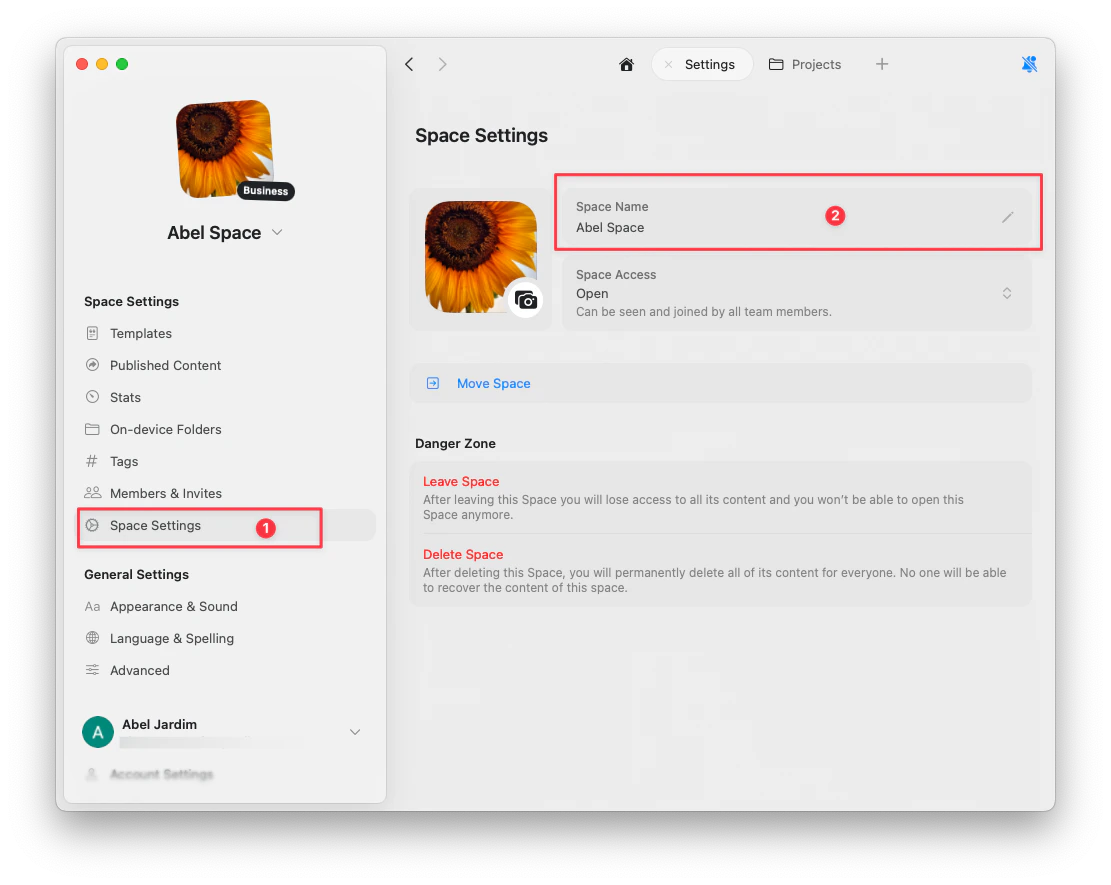 변경 사항은 자동으로 저장됩니다.
## 스페이스 간 전환
왼쪽 상단에서 **스페이스 드롭다운**을 클릭하여 스페이스를 전환하세요.
왼쪽 상단에서 **스페이스 이름**을 탭하여 스페이스 전환기를 여세요.
왼쪽 상단에서 **스페이스 드롭다운**을 클릭하여 스페이스를 전환하세요.
변경 사항은 자동으로 저장됩니다.
## 스페이스 간 전환
왼쪽 상단에서 **스페이스 드롭다운**을 클릭하여 스페이스를 전환하세요.
왼쪽 상단에서 **스페이스 이름**을 탭하여 스페이스 전환기를 여세요.
왼쪽 상단에서 **스페이스 드롭다운**을 클릭하여 스페이스를 전환하세요.