> ## Documentation Index
> Fetch the complete documentation index at: https://craft-support.mintlify.site/llms.txt
> Use this file to discover all available pages before exploring further.
# スペース名の変更
> コンテンツをより整理するために、スペースの名前を変更できます。
Craftのスペースは、コンテンツを整理し、効果的に共同作業を行うのに役立ちます。所有している、または管理者権限を持つスペースの名前は変更できます。
## スペースの名前を変更する
「**設定**」を選択します。
**スペース設定** を選択します。
「**スペース名**」欄を更新します。
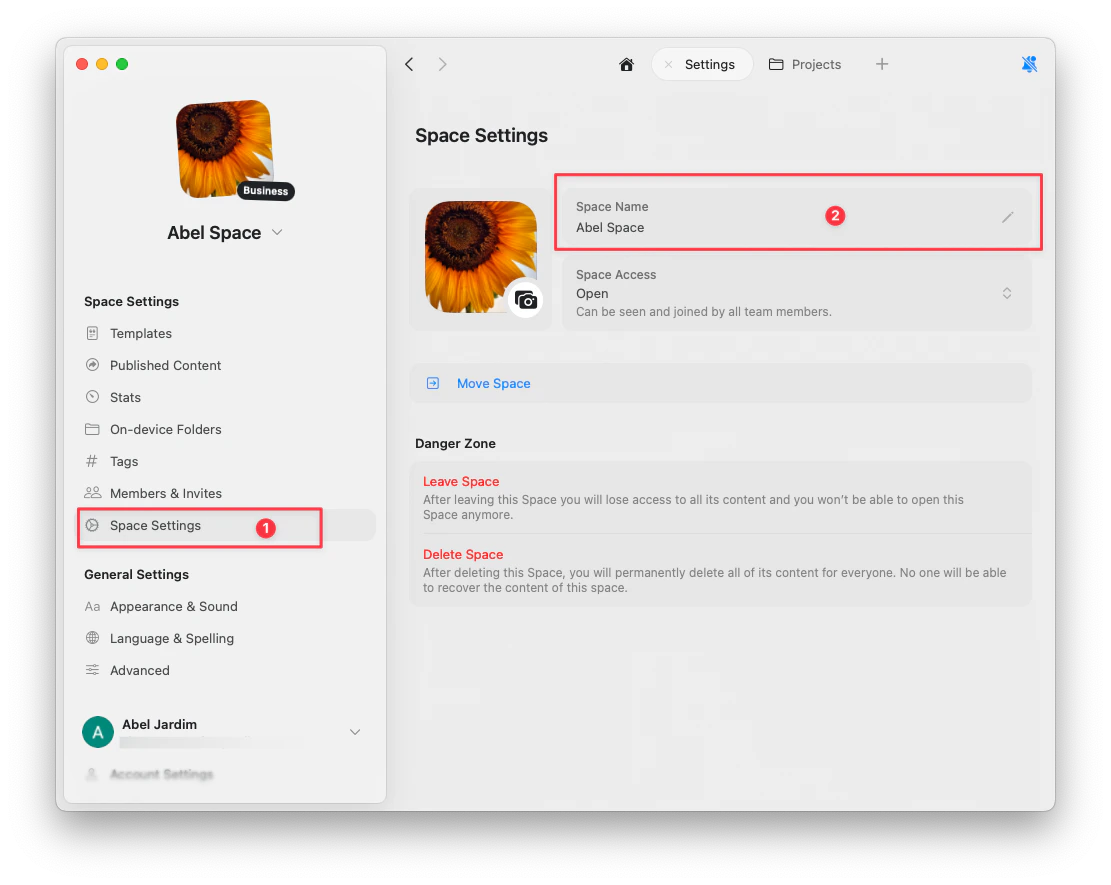 変更は自動的に保存されます。
## スペースを切り替える
左上の**スペースのドロップダウン**をクリックして、スペースを切り替えます。
左上の**スペース名**をタップして、スペース切り替えを開きます。
左上の**スペースのドロップダウン**をクリックして、スペースを切り替えます。
変更は自動的に保存されます。
## スペースを切り替える
左上の**スペースのドロップダウン**をクリックして、スペースを切り替えます。
左上の**スペース名**をタップして、スペース切り替えを開きます。
左上の**スペースのドロップダウン**をクリックして、スペースを切り替えます。